Shipping SpecOps to the BApp Store
Turning OpenAPI specs into a Burp workbench, and the months of review that got it into the BApp Store.
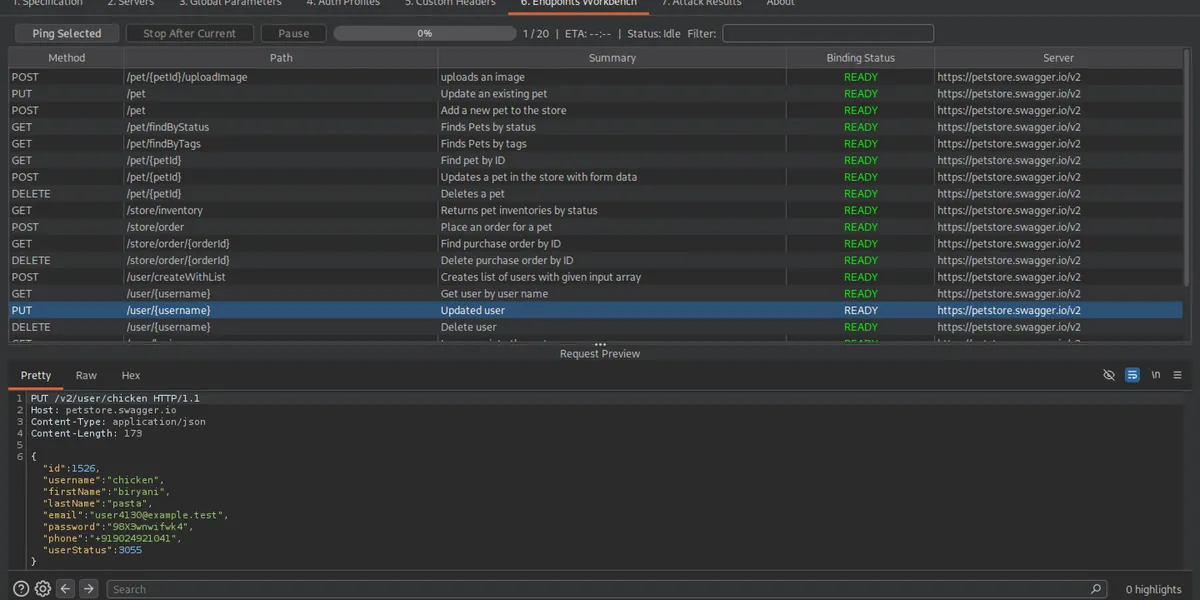
SpecOps is now in the official BApp Store. You can install it from the Extensions tab inside Burp, no JAR downloads, no manual loading.
Here is why I built it and what the review process looked like.
The problem was copy and paste
Every API assessment starts the same way. The client sends a Swagger URL, you open it, and there are two hundred documented endpoints.
Then you start copying. Open an endpoint, read the path, note the method, work out which parameters are required, guess values for the ones the spec describes only by type, paste it into Repeater, add the auth header, send, find out you got the base path wrong. Repeat.
An hour later you have fifteen endpoints staged and your token has expired. The actual testing, the authorisation boundaries and object references and mass assignment, has not started.
That step produces nothing, and because it is slow, it is where coverage dies. You test the thirty endpoints you had patience for, write the report, and the other hundred and seventy never get looked at.
SpecOps deletes that step. Point it at a spec and you get a workbench with every documented endpoint bound to a server, populated with values, ready to send.
What it does
Seven panels, in the order you use them.
- Specification takes a spec from a file, a URL, or pasted text.
- Servers resolves the server list and lets you edit server variables.
- Global Parameters stores every parameter across the whole spec. Set a value once and it applies everywhere that parameter appears.
- Auth Profiles picks up the security schemes from the spec: API key, Bearer, JWT, Basic, and OAuth2.
- Custom Headers adds header rules with scope and overwrite control.
- Endpoints Workbench is the main screen. Every operation, filterable, with a request preview, bulk ping with progress and ETA, and routing to Repeater or Intruder.
- Attack Results keeps the request and response pairs.
The idea throughout is that a parameter is something you configure once, not once per request.
The parts that were harder than expected
Two spec formats, not one
OpenAPI 3 and Swagger 2.0 are
structurally different documents. Swagger 2 keeps schemas under definitions
and models a request body as a parameter with in: body. OpenAPI 3 moved
schemas to components/schemas and made requestBody a real thing with media
types. Branching on that through the whole codebase would have been miserable.
So SpecOps normalises. It parses with OpenAPIV3Parser from
swagger-parser first. If that
produces no paths, it checks whether the document looks like Swagger 2, both
from the parser’s own messages and by scanning the first few kilobytes for a
swagger: 2.0 declaration, then runs SwaggerConverter to convert in memory.
Everything downstream only ever sees OpenAPI 3.
Parsing is staged too. It builds a full candidate model and only swaps it in if it worked, so loading a broken spec leaves your existing workbench and values alone. That matters when you have spent twenty minutes filling in parameters and someone hands you a revised spec.
Schemas point at themselves
Real specs are full of recursion. A User has an Organisation which has a
list of User. Walk a resolved schema naively to build an example body and you
will follow that forever.
Every schema materialisation path carries a depth counter and stops past a bound. Not elegant, but it is the difference between generating a body and hanging Burp.
A type is not a value
A field described as type: string, format: uuid tells you almost nothing. Send
a random string and the endpoint rejects it at validation, before it reaches the
logic you wanted to test. All you have confirmed is that the server can return
400.
So SpecOps generates values that look real. Names containing email get an
email address, uuid gets a UUID, anything ending in id gets an integer,
token or secret gets hex.
The part that matters more is that generation is deterministic and shared.
Values are seeded from a SHA-256 hash of the parameter’s name and location, and
cached per run, so userId gets the same value in all forty endpoints that
mention it.
That is what makes the values useful. If POST /users and GET /users/{userId}
invent different identifiers you have two unrelated requests. If they share one
you have a sequence you can follow through the API.
The best values are already in your proxy
Generated values are a fallback. If you have been browsing the app, the real values are sitting in Burp’s proxy history.
SpecOps scans that history for parameters it recognises, reading JSON bodies, form-urlencoded bodies, multipart bodies, query strings, headers, and cookies. Every parameter tracks where its value came from, and harvested values beat generated ones. Anything you have locked is never overwritten by anything.
The review
I submitted on 9 October 2025 and it was approved on 27 August 2026. Five rounds of feedback, all of it in the public submission thread.
| Stage | Date | Elapsed |
|---|---|---|
| Submitted | 9 Oct 2025 | |
| Round one: the name | 12 Nov 2025 | 34 days |
| Fixed | 12 Nov 2025 | same day |
| Round two: threading | 5 Mar 2026 | 113 days |
| Fixed, v1.3.0 | 6 Mar 2026 | 1 day |
| Round three: reflection | 26 Mar 2026 | 20 days |
| Fixed, v1.3.1 | 27 Mar 2026 | 1 day |
| Round four: Servers tab | 18 Jun 2026 | 83 days |
| Fixed, v1.4.0 | 18 Jun 2026 | same day |
| Round five: automated reviewer | 9 Jul 2026 | 21 days |
| Fixed, v1.4.1 and v1.4.2 | 10 Jul 2026 | 1 day |
| Approved | 27 Aug 2026 | 48 days |
Round one: the name. PortSwigger’s guidance is that an extension name should describe what it does, and “SpecOps” does not. I made the case for keeping it and offered “OpenAPI Workbench” as an alternative. We settled on “SpecOps, OpenAPI/Swagger Workbench” the same afternoon.
Round two: threading. Parameter import, parameter export, and
results export all ran on the Event Dispatch Thread, which freezes Burp’s UI on
a large spec. They moved to SwingWorker. The same round flagged that I was
pulling the whole proxy history and filtering it myself instead of passing a
ProxyHistoryFilter
and letting Burp do it. Fixed in
v1.3.0.
Round three: reflection. I had implemented that filter using
reflection. The reviewer pointed out that the montoya-api version included the
interface directly. It became a typed call to api.proxy().history(filter) in
v1.3.1.
Round four: a real bug. The Servers tab never populated. The dropdown stayed empty, server variables could not be edited, and multi-server sending was unusable, while every other tab populated fine from the same parse.
The cause: my context object held a single listener field for server updates.
Both ServersPanel and AuthProfilesTab registered against it, and because
AuthProfilesTab is constructed second, it quietly overwrote the first. Only the
Auth tab ever got notified. The parameter update path had the same pattern
waiting to do the same thing. Both became lists in
v1.4.0.
Round five: the automated reviewer. The last round came from an
automated reviewer PortSwigger was trialling: a SwingWorker that never called
get() in done() and so swallowed exceptions, a dialog built with a null
parent that positioned itself wrong on multi-monitor setups, and a raw
JTextArea where Montoya provides a proper editor. Fixed in
v1.4.1 and
v1.4.2.
If you are submitting an extension
Read the
Montoya API docs
before you write, not after. Most of my feedback was about not using the API
the way it was designed. ProxyHistoryFilter instead of filtering by hand,
RawEditor instead of JTextArea, and suiteFrame() instead of a null parent.
Keep anything expensive off the Event Dispatch Thread from day one. Retrofitting
SwingWorker is more annoying than starting with it.
Contributing
SpecOps is Apache 2.0. Install it from the BApp Store, or grab the source on GitHub. It needs Burp Suite 2025.7 or later and Java 21.
I am always happy to work on new features and to take contributions. If you use it and something is missing, awkward, or broken, open an issue or send a pull request. Bug reports with a spec I can reproduce against are especially welcome, since most of the awkward edge cases live in real-world specs rather than the clean examples. If you would rather talk it through first, find me on LinkedIn.